I love doing web development in Chrome and Safari, as they have excellent built-in develop tools. There is one catch that I need to keep reminding myself about however that I thought I would list here: The console is rendered just like the body is (sometimes).
This important note may seem a bit cryptic, but it can best be explained by taking a look at what happens when you ask the Chrome console to console.log() the value of various data types.
Imagine you had the following simple page:
var test_int = 0;
var test_arr = [];
var test_obj = {};
var sleep = 2;

function log_and_increment() {
  if (test_int < 3) {
    test_int = test_int + 1;
    test_arr.push(test_int);
    test_obj["counter_" + test_int] = test_int;

    console.log("\r\n value of test integer: ");
    console.log(test_int);
    console.log("value of test array: ");
    console.log(test_arr);
    console.log("value of test object: ");
    console.log(test_obj);

    setTimeout("log_and_increment", sleep);
  }
}

window.onload = function () {
  console.log("Starting Tests");
  log_and_increment();
};You can see that we will be looping through this script 3 times and outputting 3 variables: an integer, an array, and an object.
Here are the results:
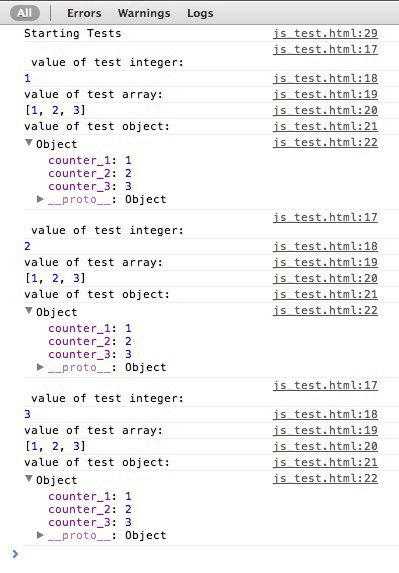
So what is going on here? If the console can render the variable directly (integer or string), it will render the variable as it was at the time of execution. If the variable is interpreted (array or object) then it will render the variable at it’s current state. If you can open the arrays in the console while he sleep is happening, you will notice them change over time. You would have expected the arrays to be:
- [1]
- [1,2]
- [1,2,3]
but they were all [1,2,3] I hope this clears up some confusion!