I've been thinking a lot about how coding agents interact with external services. At Arcade, we build agentic tools, so I spend most of my days watching AI agents try to do real things in the real world. And one pattern keeps bugging me.
We're building increasingly complex integrations to connect coding agents to MCP servers. Custom SDKs, persistent connections, elaborate client configurations. But here's the thing: these agents already know how to use the CLI. They've been trained on millions of shell sessions. curl, git, docker, npm. They know the patterns. Flags, stdin, stdout, pipes, exit codes it's all in there.
So why are we teaching them a new interface?
Why Not Just Use APIs?
I know what some of you are thinking. "Why not skip MCP entirely and just give the agent raw API access?"
I've watched agents try this. It breaks in predictable ways.
APIs are designed for developers who read documentation, understand authentication flows, and know which endpoints to call in what order. An agent staring at a raw REST API has to figure out: which of these 200 endpoints do I actually need? What's the auth scheme? What are the required headers? How do I paginate? What does error code 422 mean in this specific API's context?
That's a lot of inference work before a single useful action happens and every bit of it burns tokens and introduces failure modes.
MCP solves this at the protocol level. It gives you a standard way to advertise capabilities, describe schemas, handle authentication, and manage the lifecycle of tool calls. An MCP tool doesn't expose "here are 200 endpoints, good luck." It exposes "here are the 12 things you can do, here's exactly what each one needs, and here's how to authenticate." The agent spends its tokens on the task, not on figuring out the plumbing.
Nobody wrote blog posts declaring "REST is dead, just use curl." curl is how you talk to REST from a terminal. mcpx is how you talk to MCP from a terminal. Same relationship. The protocol still matters. The interface is what changed.
The Best of Both Worlds
What if the agent's interface to MCP was just… the CLI?
That's the idea behind mcpx. It's a command-line tool that speaks MCP under the hood but presents a shell interface on top. Think curl you don't need to understand HTTP/2 or TLS handshakes to make an API call. You just type a command and get a response.
The workflow for an agent looks like this:
# 1. Search for relevant tools across all configured MCP servers
mcpx search "create issue"

# 2. Inspect a specific tool's schema
mcpx info linear create_issue

# 3. Execute it
mcpx exec linear create_issue '{"title": "Fix the login bug", "priority": "high"}'No persistent connections to manage. No tool schemas bloating the system prompt. The agent discovers what it needs on demand, validates inputs locally before sending, and gets structured output it can parse.
When CLI, When Remote
I want to be honest about where mcpx fits and where it doesn't. This matters and I don't think the current discourse is being precise enough about it.
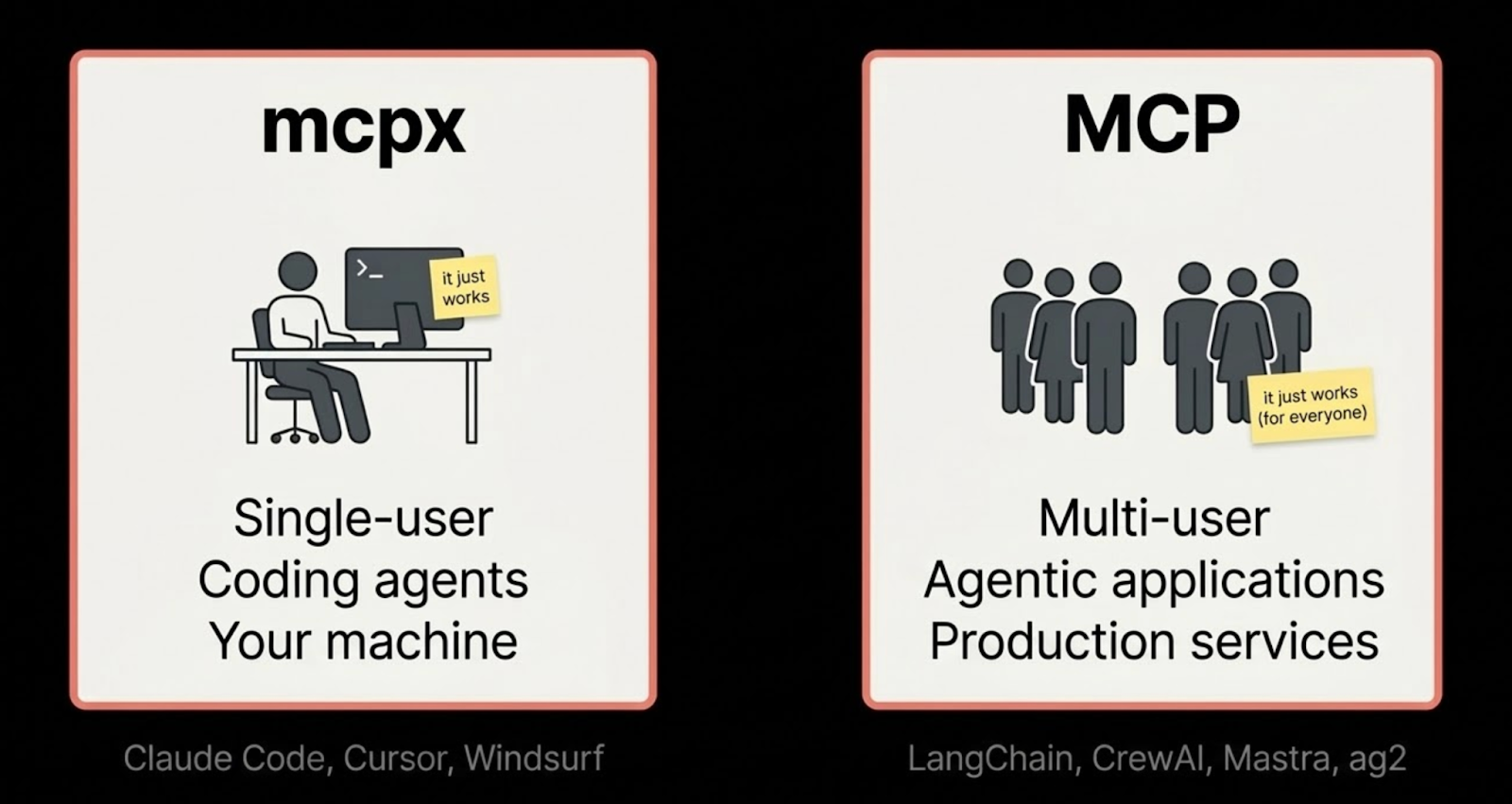
CLI (mcpx) is built for single-user, single-machine coding agents.
You're a developer. You're running Claude Code, Cursor, Windsurf, or Cline. You want your coding agent to interact with GitHub, Linear, Slack, your database without configuring a custom MCP client for every single tool. Half the MCP clients out there haven't built robust integrations yet, or they're still catching up on auth flows, or their MCP support is "technically works" but not production-ready. mcpx sidesteps all of that. One CLI, one install, every MCP server your agent needs.
That's the sweet spot: a developer, their agent, their machine.
Remote MCP (HTTP) is built for multi-user agentic applications.
If you're building something with LangChain, CrewAI, or any framework where multiple users are triggering agents that act on their behalf, you need the full remote MCP flow. Multi-user isolation, per-user OAuth delegation, tenant-scoped permissions, centralized audit trails. The CLI isn't the right interface for that. A proper HTTP-based MCP connection through a gateway is.
These aren't competing approaches. They're different interfaces to the same infrastructure:
Same gateway. Same tools. Same auth. Same audit trail. The only thing that changes is how you connect. mcpx is the left column. If you need the right column, you need a remote MCP and that's the right call.
I'm building mcpx because the left column didn't have good tooling. Not because the right column doesn't matter.
Why This Matters for Token Efficiency
There's a practical reason this approach works well for coding agents specifically: tokens are expensive, and context windows are finite.
The typical MCP integration loads every available tool's schema into the agent's system prompt. If you've got 50 tools across 5 servers, that's a lot of context window spent on schemas the agent might never use. With mcpx, the agent starts with zero tools in context and progressively discovers what it needs. Search first, inspect second, execute third. You're only paying for what you actually use.
And because each call is ephemeral, spawn the process, get the result, done. there's no connection state to manage between turns. The agent's context stays clean.
Good Tooling Matters
If we're going to ask agents to use the CLI for MCP, the tooling needs to be good. Not "technically works" good, actually good. The way curl is good for HTTP, or jq is good for JSON.
That means:
Smart output - human-readable tables in a terminal, JSON when piped to another tool. Auto-detected, no flags needed.
Real debugging - mcpx -v shows you HTTP headers, JSON-RPC messages, and round-trip timing. When something breaks, you can see exactly what happened. Here's what that looks like when running against a production gateway like Arcade's:
mcpx -v exec arcade Gmail_WhoAmI

> POST https://api.arcade.dev/mcp/evan-coding
> authorization: Bearer eyJhbGci...
> content-type: application/json
< 200 OK (142ms)
< x-request-id: abc123That authorization header isn't a shared API key sitting in a .env file. It's a scoped OAuth token - the Gateway handled the auth flow, enforced permissions, and logged the call. I just typed a command.
Search that works - keyword matching is fine for when you know what you're looking for. But agents often don't. mcpx includes semantic search using a local embedding model (no API key, no network calls) so agents can find tools by describing what they want to accomplish.
Full protocol support - OAuth for remote servers, async tasks for long-running operations, server-requested input (elicitation), structured logging. The MCP spec is moving fast, and your CLI client needs to keep up.
Up-to-Date Clients Matter Too
This is the part that doesn't get enough attention. MCP is a young protocol, and the spec is evolving quickly. Tasks, elicitation, structured logging - these are all relatively new additions, and they matter for real-world use.
mcpx tracks the latest MCP SDK and implements the full spec: stdio and HTTP transports (with automatic Streamable HTTP → SSE fallback), OAuth discovery and token refresh, JSON Schema validation, task management with cancellation, and server-requested input flows. When the spec adds something new, the CLI should support it - otherwise agents are stuck with a partial view of what MCP can do.
Try It
mcpx is open source (MIT) and available as a single binary or via npm:
# Install
bun install -g @evantahler/mcpx
# or
curl -fsSL https://raw.githubusercontent.com/evantahler/mcpx/main/install.sh | bash

# Configure a server
mcpx add github --url https://mcp.github.com

# Start exploring
mcpx search "pull request"If you're using Claude Code or Cursor, mcpx ships with built-in agent skills:
mcpx skill install --claude    # Claude Code
mcpx skill install --cursor # CursorOne command, and your coding agent knows how to discover and use MCP tools on demand, no schema bloat, no persistent connections.
I use mcpx against Arcade's gateway daily, that's how I get access to tools across GitHub, Slack, Google Workspace, Linear, and a bunch of other services without configuring each one individually. The gateway handles OAuth and audit logging, so I don't have to think about it.
mcpx add arcade --url https://api.arcade.dev/mcp/engineering-tools
mcpx search "send email"If you're building with MCP servers or building MCP servers give it a shot. The iteration speed difference has been significant for me.
Source: github.com/evantahler/mcpx
Evan Tahler is Head of Engineering at Arcade, the only runtime for MCP. He built mcpx because something needed to exist and it didn't.